Best Home Office Gear in 2026: Top Picks for a Productive Work-From-Home Setup
A productive home office starts with the right chair. Our top pick is the Herman Miller Aeron, the chair that set the standard for ergonomic seating and continues to hold it. Below, we’ve rounded up five pieces of home office gear that make a real difference for anyone working from home full-time — from the chair you sit in to the light that saves your eyes at the end of a long day.
What We Tested
Herman Miller Aeron — Best Ergonomic Chair
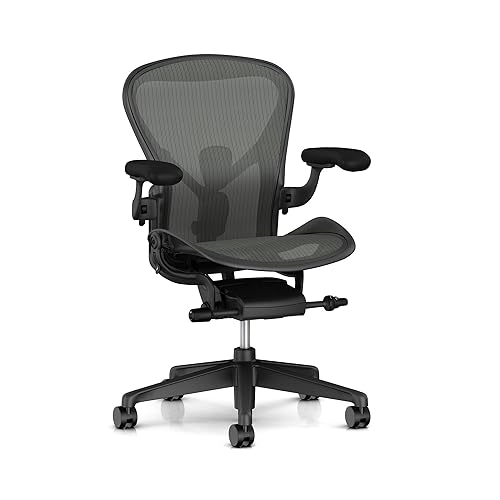
The Herman Miller Aeron is the benchmark every other ergonomic chair gets measured against. The 8Z Pellicle mesh seat and back distribute your weight evenly and breathe well enough that you won’t feel hot after hours of sitting. The PostureFit SL lumbar support system braces both the sacrum and lumbar spine independently, which is the detail that separates it from chairs with a single lumbar pad. The tilt mechanism has multiple tension settings and a recline limiter so you can lock your preferred position. It comes in three sizes (A, B, C) fitted to different body types, and the build quality is such that used Aerons from a decade ago still hold up. The investment is real, but so is the difference it makes over a full workday.
Pros: Unmatched lumbar and pelvic support with PostureFit SL, breathable mesh eliminates heat buildup, three sizes for a proper fit, adjustable armrests with height and width settings, durable enough to last 10+ years
Cons: Premium price is the main barrier, sizing matters — measure before buying
→ Check Price on AmazonLG 27″ 4K Monitor — Best Monitor

A 4K monitor changes the experience of working with text, spreadsheets, and design files in a way that’s hard to fully appreciate until you’ve used one. The LG 27UK850 delivers a 27-inch IPS panel at 3840×2160 resolution with accurate color reproduction (99% sRGB), HDR10 support, and USB-C connectivity that lets you power a MacBook while using a single cable for video and data. The stand adjusts for height, tilt, and pivot so you can dial in your exact ergonomic position. At 27 inches, the pixel density is high enough that text looks sharp without needing display scaling.
Pros: Crisp 4K IPS panel with accurate colors, USB-C with 60W power delivery simplifies cable management, height-adjustable stand, HDR10 support
Cons: No built-in webcam, HDR performance is good but not reference-grade
→ Check Price on AmazonLogitech MX Master 3 — Best Mouse

The Logitech MX Master 3 is the kind of mouse you switch to and immediately wonder why you waited. The MagSpeed electromagnetic scroll wheel can glide through long documents in a second or ratchet for precise line-by-line control, depending on how hard you flick it. The thumb wheel on the side handles horizontal scrolling in spreadsheets without needing to hold shift. It’s wireless via Bluetooth or the Logi Bolt receiver, pairs with up to three devices so you can switch between laptop and desktop with a button press, and the ergonomic shape actually fits a full-sized hand. Battery life runs to 70 days on a single charge.
Pros: MagSpeed scroll wheel is genuinely best-in-class, multi-device pairing with Easy Switch button, 70-day battery, comfortable for long work sessions
Cons: Sized for right-handed use only, larger than travel-friendly mice
→ Check Price on AmazonLogitech MX Keys — Best Keyboard

The Logitech MX Keys is a low-profile wireless keyboard that pairs well with the MX Master 3 — same Bluetooth ecosystem, same Easy Switch button to hop between three devices, same Logitech Options software for customization. The spherically shaped keys have a concave dip that guides your fingertips to center, making it noticeably more accurate to type on than a flat slab keyboard. It’s quiet, the backlighting turns on automatically when your hands approach and dims when they move away, and it charges via USB-C. Compatible with Windows, Mac, and Linux, with OS-specific key layouts available.
Pros: Excellent typing feel with spherical key design, smart backlighting saves battery, multi-OS support, matches the MX Master 3 perfectly as a pair
Cons: No mechanical feel (tactile switch fans may want a mechanical board instead), function row layout takes some adjusting
→ Check Price on AmazonBenQ ScreenBar — Best Monitor Light

A monitor light bar solves the problem that a desk lamp never quite does: it illuminates your keyboard and documents without creating glare on your screen. The BenQ ScreenBar clips to the top of any monitor, draws power from a USB port so no extra cables are needed, and uses an asymmetric optical design that directs all the light downward onto your work surface instead of into your eyes. The built-in auto-dimming sensor reads the ambient light in the room and adjusts brightness automatically. It’s one of those simple additions that makes your desk feel more thought-through without taking up any space.
Pros: No screen glare by design, powers from USB with no separate adapter, auto-dimming sensor, clips to any monitor without tools
Cons: No wireless control on the base model (upgrade to ScreenBar Halo or Plus for that), limited mounting options beyond the clip
→ Check Price on AmazonDisclosure: TheReviewRoundup.com is a participant in the Amazon Services LLC Associates Program. When you click our links and make a purchase, we may earn a small commission at no extra cost to you. We only recommend products we’d actually use.
Frequently Asked Questions
What home office gear makes the biggest difference in productivity?
An external monitor is the highest-impact upgrade for most people — the extra screen space reduces task-switching and eye strain dramatically. After that: a proper chair with lumbar support, a mechanical or ergonomic keyboard, and eliminating cable clutter with a simple desk pad and cable management kit.
How much should I budget for home office gear?
A functional, comfortable home office can be put together for $400–$700: a monitor ($150–250), a decent chair ($150–200 used or refurbished), a keyboard and mouse combo ($50–100), and basic accessories. Prioritize the chair and monitor first, then add over time.
Do I need a standing desk for a home office?
Not necessarily, but it’s a meaningful long-term upgrade if you sit 6+ hours a day. The benefit is the ability to break up long sitting sessions without leaving your desk. A budget sit-stand desk starts around $350–$400 and pays for itself in reduced back fatigue over months of use.
What’s the best way to reduce desk clutter in a home office?
Three things make the most difference: a cable management tray under the desk, a minimal desk pad as a clean visual anchor, and a single drawer unit for items that pile up on the surface. Monitor arms instead of stands free up desk real estate without adding furniture footprint.